Journal Finder: Match Your Abstract to the Right Journal
Paste your abstract, title or keywords to search 40,000+ journals across all publishers. Compare Scopus and Web of Science indexing, SJR quartiles, open access status and APCs.
Search by
How to use the Paperpile Journal Finder
The Paperpile Journal Finder helps you quickly discover journals that match your manuscript. It returns a ranked list of up to 100 matching journals, complete with publisher information, indexing databases, quality metrics, and open access costs.
Search by Keywords
- Select Keywords.
- Enter one or more keywords, separated by commas. These can be subject terms from your manuscript, broad research categories, or even words from a specific journal title.
- Click Search journals.
Search by Subject category
- Select Category.
- Start typing to find and select a subject category from the list. Categories are based on Scopus All Science Journal Classification (ASJC) subject areas.
- Click Search journals.
Search by Manuscript title and/or abstract
- Select Manuscript title/abstract.
- Paste your title, abstract, or both.
- Click Search journals.
In a few seconds, Paperpile analyzes your text and returns a list of the best-matching journals, so you can compare options without opening dozens of tabs.
Filter your results
Before searching, you can narrow your results with two optional filters:
- Open access only: Check this box to show only journals that offer an open access publishing option, including fully open access and hybrid journals.
- Minimum quartile: Select a minimum SJR quartile ranking (Q1–Q4) to filter out lower-ranked journals.
What you'll see for each journal
Each journal card is designed to answer the questions authors care about most:
- Is this journal reputable?
- Is it legitimate?
- Is it discoverable?
- Is it a good fit?
- What will it cost?
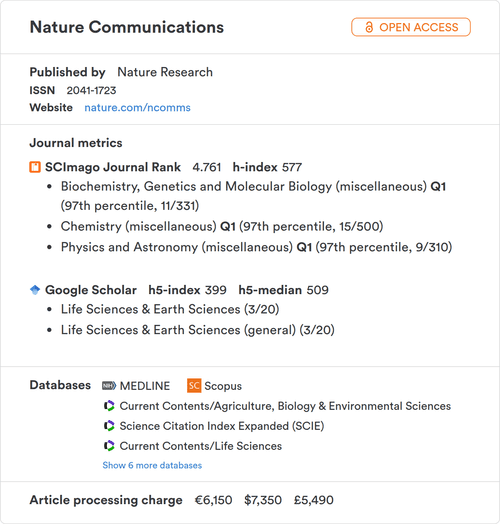
Basic information
Website: Direct link to the journal's homepage, so you can quickly check the scope, editorial board, and submission guidelines.
Open access status: Each journal is labeled as either Open Access (all articles are freely available) or Hybrid Open Access (offers both open access and subscription-based publication).
Publisher: You'll see the publishing house behind the journal: Elsevier, Springer Nature, Wiley, MDPI, Taylor & Francis, Oxford University Press, SAGE, and many others. Knowing the publisher helps you gauge reputation, understand submission platforms, and check whether your institution has a publishing agreement that could reduce costs.
ISSN: The International Standard Serial Number uniquely identifies the journal. You'll need this when verifying journals in databases, reporting publications to your institution, or filling out grant applications.
Journal metrics
You'll find key quality indicators from SCImago and Google Scholar.
- SCImago Journal Rank (SJR): The SCImago Journal Rank (SJR) is a prestige metric developed by the SCImago research group using Scopus data. Unlike simple citation counts, SJR weights citations by the prestige of the citing journal. A citation from a leading journal counts for more than one from a lower-ranked journal. This approach is inspired by Google's PageRank algorithm.
- Google Scholar metrics: Google Scholar Metrics ranks journals based on their h5-index, which is the largest number h such that h articles published in the last five years have each been cited at least h times. For example, an h5-index of 72 means 72 articles from the past five years have been cited at least 72 times each.
- Quartile rankings (Q1–Q4) Quartile rankings divide all journals in a given subject category into four equal groups based on a quality metric, typically the SCImago Journal Rank (SJR) or Clarivate's Journal Impact Factor (JIF).
Q1 = top 25% of journals in that category (highest prestige) Q2 = 25th–50th percentile Q3 = 50th–75th percentile Q4 = bottom 25% Rankings are always relative to a specific subject category! A multidisciplinary journal might be Q1 in one field and Q2 in another, because it's compared against different sets of journals in each category. The Journal Finder shows rankings for every category a journal belongs to, so you can see exactly where it stands in your area.
Indexing databases
The results show which major databases index the journal, such as Scopus, Web of Science, Medline, DOAJ, EBSCO, Proquest, and others. Indexing in these databases is a strong signal of journal quality and determines whether your paper will be discoverable through the search tools most researchers use. Indexing is also one of the strongest signals that a journal is legitimate. Both Scopus and Web of Science evaluate journals against editorial and ethical criteria before including them, and DOAJ applies similar standards to open access journals. This is why organizations like Think Check Submit recommend checking indexing status as a core part of vetting any journal.
Article processing charge (APC)
The APC shown in the Paperpile Journal Finder is typically the maximum list price for publishing an article open access in that journal. The amount you'll actually pay may be lower, for several reasons:
- Institutional agreements. Many universities have "read and publish" or transformative agreements with major publishers that cover part or all of the APC for affiliated researchers. Check with your library to see what agreements are in place.
- Publisher discounts. Some publishers offer waivers or discounts for researchers in lower-income countries, early-career researchers, or members of certain societies.
- Article type. Review articles, short communications, or letters may have different fees than full research papers.
- Hybrid journals. If a journal publishes both open access and subscription content (a "hybrid" model), the APC only applies if you choose the open access option. You can always publish behind the paywall at no direct cost to you.
Before budgeting for APCs, always check your institution's library website for current publishing agreements.
Other journal finder tools
- Elsevier Journal Finder: matches your abstract to Elsevier journals specifically.
- Springer Nature Journal Suggester: recommends journals from the Springer Nature portfolio.
- Wiley Journal Finder: finds matching Wiley journals based on your abstract.
- IEEE Publication Recommender: for engineering and technology research within the IEEE portfolio.
- JANE (Journal/Author Name Estimator): matches your title or abstract to journals indexed in Medline.
Unlike publisher-specific tools, the Paperpile Journal Finder searches across all publishers and is not limited to any single portfolio, giving you an unbiased view of your options.
Data sources and coverage
The Paperpile Journal Finder searches over 40,000+ journals across all disciplines and publishers. Metrics come from SCImago (using Scopus data) and Google Scholar. Indexing status is verified against current title lists from Scopus, Web of Science, Medline, DOAJ, and other major databases. Data is updated regularly. If you spot an error, let us know at support@paperpile.com.
Frequently asked questions
What's the difference between SJR and Impact Factor?
Both measure journal influence, but they use different methods. The SCImago Journal Rank (SJR) weights citations by the prestige of the citing journal and is based on Scopus data. The Journal Impact Factor (JIF), published by Clarivate, calculates average citations per article using Web of Science data and requires a subscription. The Journal Finder uses SJR because it's freely available and accounts for citation quality, not just quantity.
Does indexing in Scopus or Web of Science mean a journal is legitimate?
Indexing is one of the strongest quality signals, because both databases evaluate journals against editorial and ethical criteria before including them. But indexing alone isn't a guarantee. Journals can be delisted if standards slip.
What is a good h5-index?
It depends on the field. In large disciplines like medicine or computer science, leading journals can have h5-indices above 200. In smaller fields, 30–50 might be top-tier. The most useful comparison is within your own discipline, which is why the Paperpile Journal Finder shows quartile rankings relative to specific subject categories.
Can I use the Paperpile Journal Finder before I've written my paper?
Yes. Search by keyword to explore journals in your area before you start writing. This helps you understand what different journals publish, which can shape how you frame your work.